25. April 2013

Jessica Nierth – Blog 2.0

Link to Website: http://jnierth.de/de

Project specifics

Client information

  • Agency: Private (Sydney)
  • Country: Australia
    • Die erste Version meiner Webseite habe ich 2010 mit WordPress 2.9 erstellt. Seitdem WordPress 3.0 veröffentlicht wurde hat sich viel in der WordPress-Architektur verändert. Ich war daran interessiert diese Verbesserungen auszutesten und darüber hinaus meine Webseite für alle Auflösungen der möglichen Endgeräte anpassbar zu machen (responsive).

      Entgegen meiner Erwartung war die reine Software-Entwicklung der einfachste Teil. Die meiste Zeit hat die Planung in Anspruch genommen um zu entscheiden wie das Backend aufgebaut werden muß um das Eintragen der Inhalte möglichst komfortabel zu gestalten. Dahingehend bietet WordPress einfache aber mächtige Programmier-Strategien an. Ich begann die Entwicklung des Backends per Shortcodes zu erweitern, bis ich erkannte welche Inhalte ich für bestimmte Beitragstypen (engl. Post-Types) immer wieder brauchte. Anschließend änderte ich meine Entwicklungs-Strategie und setzte Meta-Boxen ein. Diese stelle ich als Plugins zur Verfügung um sie jederzeit ein- und ausbauen zu können. Natürlich muss man diese Entscheidung vom Anwendungsfall abhängig machen. Muss z.B. ein Theme entwickeln wobei die wichtigste Anforderung auf der Anpassbarkeit der Oberfläche für Nicht-Programmierer besteht, sind Shortcodes das bessere Mittel. Der Anwender kann über den Text-Editor im Backend selbst entscheiden an welcher Stelle im Frontend er einen bestimmten Inhalt anzeigen will. Die eigentliche Quellcode-Generierung wird dem Anwender jedoch abgenommen.

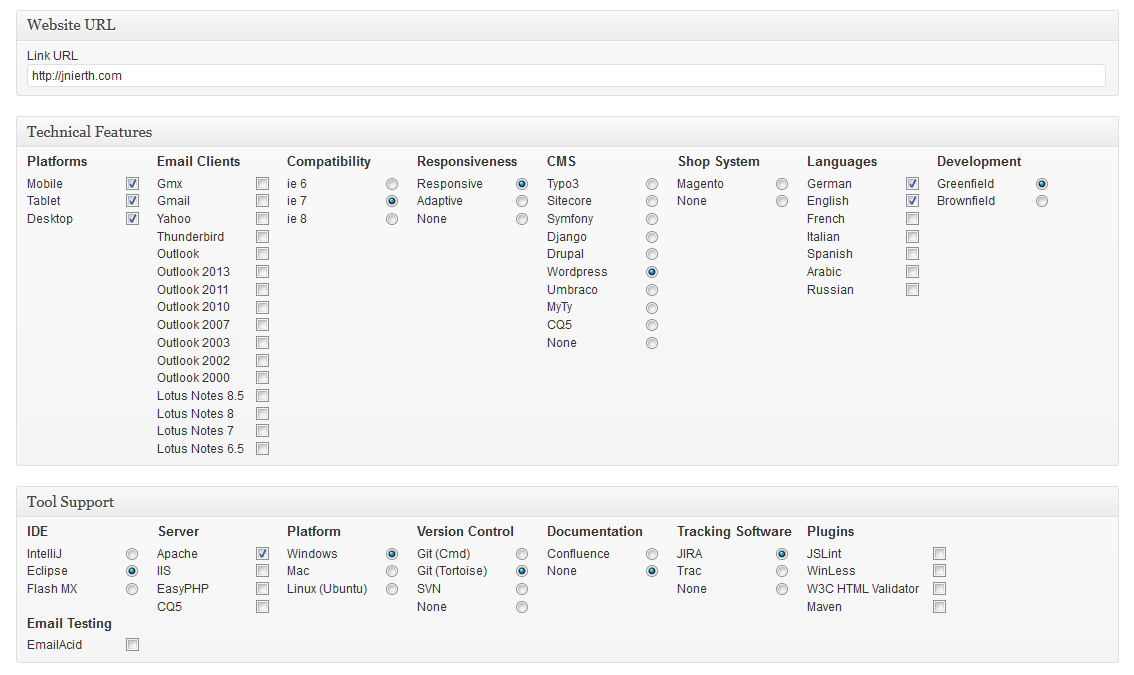
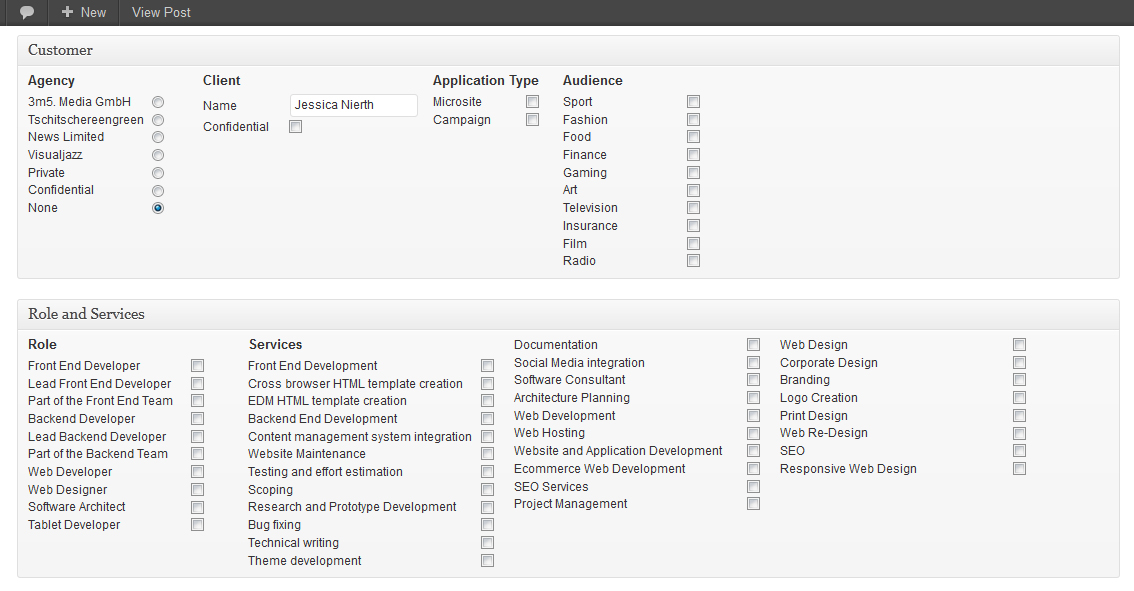
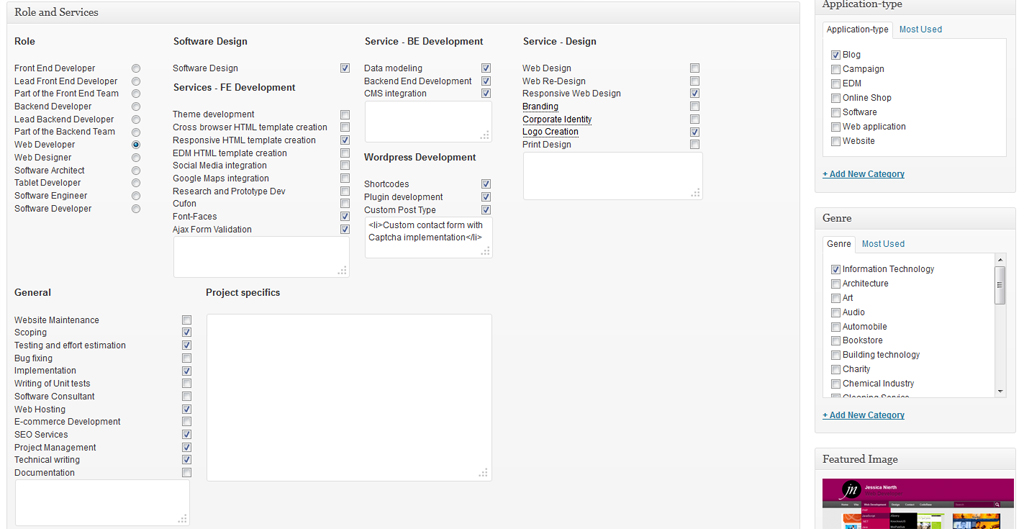
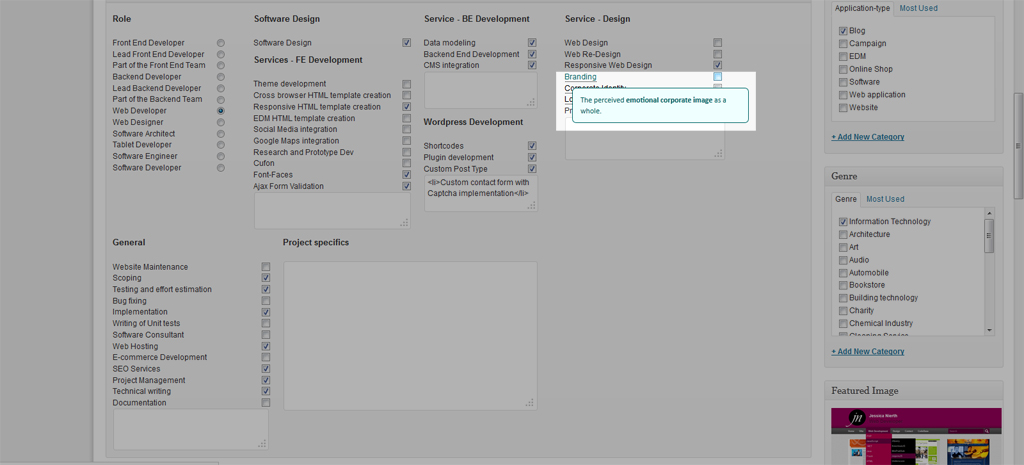
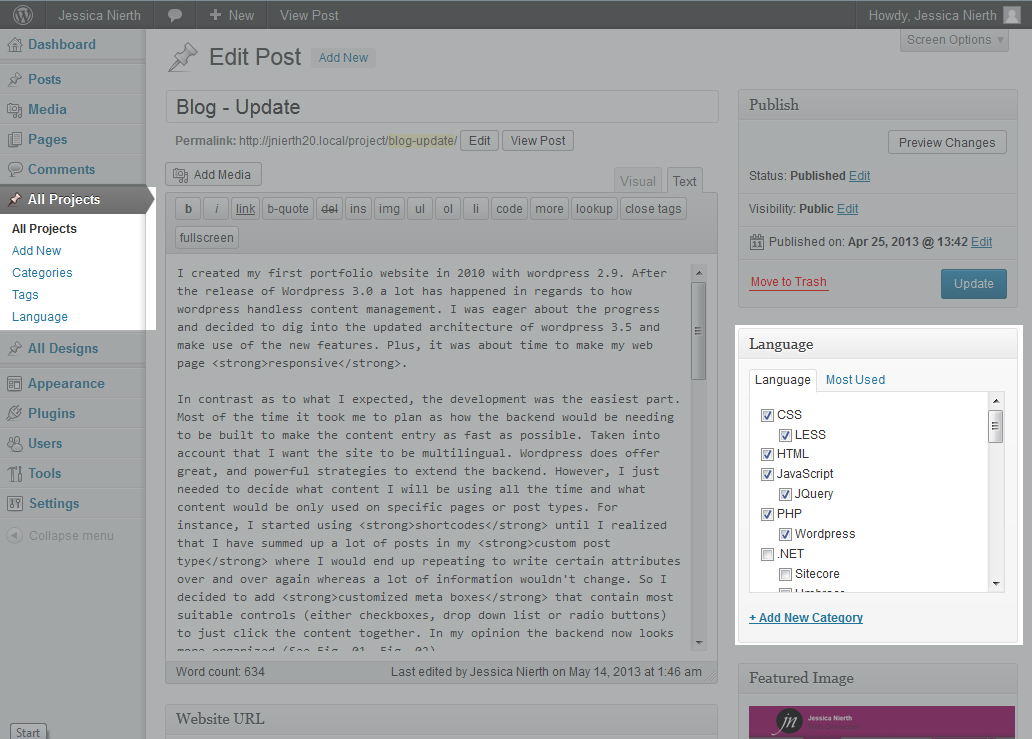
      In meinem Fall habe ich angepasste Beitragstypen – Projekte (Abb. 01) und Designs – erstellt deren Inhalte zügig über jeweilige Kontroll-Elemente (Checkboxen, Radio-Buttons, etc.) gefüllt werden können (Abb. 02, Abb. 03).
      Es ist mir auch wichtig immer das richtige Werkzeug zu verwenden. Hierzu habe ich Mikroformate eingesetzt um eine standardisierte Formatierung der Inhalte anzuwenden. Leider werden Mikroformate nicht in dem Grad unterstützt der mir lieb wäre aber Fakt ist: Die Verwendung von Mikroformaten ist einfach, sie führen nicht zu Seiten-Effekten wenn der Browser das Format nicht kennt aber wenn es bekannt ist, bieten sie große Vorteile. Es gibt z.B. Plugins für den Browser welche die Informationen der Mikroformate auslesen und in andere Formate exportieren oder in Anwendungen eintragen können. So können z.B. Kontakt-Daten oder Ereignis-Daten in das persönliche Adressbuch eingetragen werden (siehe [1]). In wiefern diese Formate in Zukunft einen positiven Einfluss auf Suchmaschinenoptimierung haben ist noch abzuwarten.

      Um JavaScript nur als Erweiterung zu verwenden, habe ich mich bemüht weitestgehend auf andere Mittel auszuweichen. So basieren auf dieser Seite eingesetzte Bilder-Gallerien komplett auf CSS3 bis zum Internet Explorer 7. Für alle älteren Browser wird die Darstellung entsprechend angepasst so dass die Seite immer noch funktionsfähig ist (vergleiche Abb. 06 mit Abb. 07). Darüber hinaus habe ich das Navigationsmenü per ‘off-canvas’ Methode integriert. Diese Methode hat den Vorteil dass sie auf dem nativen CSS Selektor :target basiert. Animationen können natuerlich im Nachhinen mit CSS 3 oder JavaScript hinzugefügt werden.
      Die Performanz betreffend werden alle Bilder dem Endgerät entsprechend ausgeliefert, so ist die maximale Breite der Bilder für mobile endgeräte 240px, für Tablets 575px und für Desktops 960px. Des Weiteren habe ich sog. Sprites eingesetzt um die Anzahl von Requests zu minimieren.

      test

      [1] https://addons.mozilla.org/En-us/firefox/addon/operator/

      Technical Features

      • Platforms: Mobile, Tablet, Desktop
      • Project Group: Greenfield
      • HTML5: Yes
      • Responsiveness: Responsiv
      • Browser Compatibility: IE9+
      • CMS: WordPress

      Tool Support

      • IDE: IntelliJ
      • Server: Apache
      • Platform: Windows
      • Version Control: Git (Tortoise)

      Project specifics

      Client information

    • Agency: Private (Sydney)
    • Country: Australia
      • My Services

          • Frontend Services
          • Theme development
          • Responsive cross browser compatible HTML template creation
          • Ajax form validation
          • Backend Services
          • Development of the backend
          • CMS integration
          • Web Design Services
          • Web Design
          • Corporate Identity
          • Logo creation
          • General services
          • Website Maintenance
          • Deployment
        25. April 2013

        Jessica Nierth – Blog 2.0

        Link to Website: http://jnierth.de/en

        Project specifics

        • Role: Lead Web Developer
        • Application type:
        • Application category:

        Client information

      • Agency: Private (Sydney)
      • Country: Australia
        • I created my first portfolio website in 2010 with wordpress 2.9. After the release of WordPress 3.0 a lot has happened in regards to how wordpress handless content management. I was eager about the progress and decided to dig into the updated architecture of wordpress 3.5 to use the new features. Plus, it was about time to make my web page responsive.

          In contrast as to what I expected, the development was the easiest part. Most of the time it took me to plan how the backend would have to be built to make the content entry as fast as possible. Taken into account that I want the site to be multilingual. WordPress does offer great and powerful strategies to extend the backend. However, I just needed to decide what content I will be using all the time and what content would be only used on specific pages or post types. For instance, I started using shortcodes until I realized that I have summed up a lot of posts in my custom post type (see Fig. 01) where I would end up repeating to write certain attributes over and over again whereas a lot of information wouldn’t change. So I decided to add customized meta boxes that contain most suitable controls (either checkboxes, drop down list or radio buttons) to just click the content together. In my opinion the backend now looks more organized (See Fig. 02, Fig. 03).

          To use the right tools for the right cause, I used Microformats to standardize the way the information is marked up so that it can easily be extracted. Unfortunately, there are not many tools that support microformats yet as I wished it to be but the fact is: Microformats can easily be used and don’t cause any side effects if the browser does not know the format. On the other hand, they can be of great benefit if the client is receptive to microformats. E.g. there are browser plugins that extract microformats on a page and you can export and update event dates or contact information with just one click in your event calendar or adress book.

          Since it is very important to me to only use JavaScript to extend the user experience but not rely on it. I carefully made sure to follow this maxime while not giving up on latest technologies. For example, the main menu drop down listings are purely made via CSS. Also, on the posts overview pages the date that moves up from the bottom of the thumbnail once the user hovers over it is done via CSS3 animations (see Fig. 06). Only on IE8 and IE7 which unfortunately do not cope with CSS3, I made the same animation work with the help of JavaScript. However, if JavaScript is turned off, the date will be visible right from the start.

          Also there are different approaches as to how to provide a menu for mobile phones whereas many of them also rely on JavaScript. In the case of mobile phones or tablets I think it is ok to rely on JavaScript but if there is a way without it while getting the same result in regards to function I will always go with that approach. So I used the off-canvas method to make the main menu work without JavaScript. This method uses the native :target CSS selector to decide whether or not the menu needs to be visible. In case the menu needs to be fancy e.g. fading in or smoothly sliding down, that can still be done via JavaScript.

          [1] https://addons.mozilla.org/En-us/firefox/addon/operator/

          Technical Features

          • Platforms: Mobile, Tablet, Desktop
          • Project Group: Greenfield
          • HTML5: Yes
          • Responsiveness: Responsiv
          • Browser Compatibility: IE7+
          • CMS: WordPress

          Tool Support

          • IDE: IntelliJ
          • Server: Apache
          • Platform: Windows
          • Version Control: Git (Tortoise)

          Project specifics

          • Role: Lead Web Developer
          • Application type:
          • Application category:

          Client information

        • Agency: Private (Sydney)
        • Country: Australia
          • My Services

              • Frontend Services
              • Theme development
              • Responsive cross browser compatible HTML template creation
              • Ajax form validation
              • Backend Services
              • Development of the backend
              • CMS integration
              • Web Design Services
              • Web Design
              • Corporate Identity
              • Logo creation
              • General services
              • Website Maintenance
              • Deployment